A landing page that looks great but does not convert is a UX problem. A landing page that converts once but frustrates users into never coming back is a CRO problem. Same page, different failure modes. Same fix: stop treating these as separate workstreams. We see the split constantly when onboarding new clients at Apexure. One team is building Figma prototypes based on design principles. Another team is running A/B tests based on whatever the founder read on LinkedIn that morning. Neither team has access to the other’s data. The designer does not know which layout actually converted better. The CRO analyst does not know why users are rage-clicking the hero section. After nearly a decade of running CRO programmes, the pattern is clear: the biggest conversion lifts do not come from better design OR better testing in isolation. They come from using UX research to find the real problems, then using CRO experiments to validate the fixes. This guide is the process we actually use.
What is CRO? what is UX? why the distinction matters
Before getting into the process, a quick clarification, because we have sat in enough meetings where people use “CRO” and “UX” interchangeably, and the confusion costs real money.
Conversion rate optimization (CRO) is the systematic process of increasing the percentage of visitors who complete a desired action. It is driven by data, experimentation, and statistical validation. The output is measurable: conversion rate went from X% to Y%.
User experience (UX) is the practice of making the entire journey smooth, intuitive, and satisfying. It draws on research, psychology, and design principles. The output is qualitative: users can complete tasks more easily, with less frustration. The confusion happens because they share the same goal, getting more people to convert, but they approach it from different angles. UX asks “is this experience good?” CRO asks “does this change measurably improve the number?”
CRO Focus
- Conversion rate as the primary metric
- A/B testing and multivariate experiments
- Statistical significance before rolling out changes
- Revenue and business impact measurement
- Hypothesis-driven: test specific changes
- Often works on individual pages or funnels
UX Focus
- User satisfaction and task completion
- Usability testing, surveys, session recordings
- Qualitative insights from real users
- End-to-end journey design
- Research-driven: understand the problem first
- Works across the entire product experience
The relationship is not “CRO vs UX”. It is “UX research informs CRO experiments.” Without UX research, you are testing random hypotheses. Without CRO experimentation, you are implementing changes based on opinions.
Why best practices hit a ceiling
Here is the uncomfortable truth about “top 10 UX tips” articles: they work, once. You implement the green CTA button, the single-column layout, the social proof above the fold. Conversions tick up 5-10%. Then nothing. The problem is not that the advice was wrong. The problem is that your competitors read the same article. When everyone follows the same playbook, the playbook stops being an advantage. The initial gains came from fixing obvious problems. The sustained gains require knowing something your competitors do not: what YOUR users specifically need.
A 2026 Baymard Institute study found that the average e-commerce site can gain a 35.26% increase in conversion rate through better checkout design alone. But which checkout changes matter for YOUR users? That depends on where they abandon, why they hesitate, and what they need to feel confident. Generic best practices cannot tell you that. Research can.
How to integrate UX research into your CRO process
This is the actual process we run at Apexure. Not a conceptual model, the real sequence of steps, with the real tools, that we use on every client engagement.
Step 1: UX research, find where users actually struggle
This is where most CRO programmes go wrong: they skip straight to testing. Do not do that. Before touching any design or copy, watch what your users are actually doing. The research toolkit:
- Heatmaps and scroll maps (Hotjar, Microsoft Clarity), show where users click, how far they scroll, and what they ignore
- Session recordings, watch real users move through your site. Look for rage clicks, U-turns, and form abandonment patterns
- User surveys, ask visitors why they did not convert. Post-exit surveys are particularly valuable
- GA4 funnel analysis, identify where in the conversion funnel the biggest drop-offs happen
- Competitor UX audit, see what your competitors do differently at key friction points The goal is not to collect data for data’s sake. It is to build a map of friction points, the specific moments where users hesitate, get confused, or leave.
Step 2: the “so what?”, turn data into testable hypotheses
This is where we spend the most time arguing with clients, in a productive way. They want to jump straight from “we found a problem” to “let us redesign the page.” The step in between is what separates random changes from informed experiments. The technique is borrowed from management consulting. Ex-McKinsey consultant Ameet Ranadive wrote about the question his teams used relentlessly: “Where’s the So What?” We adapted it for CRO work, and it is now baked into every engagement. Here is how it works in practice:
Observation: 30% of visitors click the logo at the top of the landing page.
So what? Users want to know more about the brand before converting.
So what? We have two testable hypotheses:
- Redirect logo clicks to the main website (let them research, then return)
- Add a brief “About Us” trust section on the landing page itself
So what? We can A/B test both against the current version and measure which drives more conversions. Without the “So What?” chain, that heatmap data is just a stat in a report. With it, you have two test concepts ready to run.
The "So What?" Framework
- Start with an observation from your UX research (heatmap, recording, survey response)
- Ask "So What?" to uncover the user intent behind the behaviour
- Ask "So What?" again to identify what you can change
- Formulate a hypothesis: "If we [change], then [metric] will improve because [user insight]"
- Define success criteria before running the test, what uplift makes this a winner?
Step 3: prioritise by impact and effort
After a thorough UX research phase, you will have 15-20 hypotheses. You can test maybe 3-4 per month. Choosing the wrong three means months of wasted capacity. At Apexure, we use the EPIC framework (Experimentation, Priority, Impact, Cost) to score every potential test on four dimensions:
- How innovative is this test? (1 = safe incremental, 5 = bold new approach)
- How urgent is this fix? (1 = nice-to-have, 5 = revenue blocker)
- Expected conversion uplift potential (1 = marginal, 5 = major)
- Time and resources needed (1 = weeks of dev work, 5 = quick to implement) Tests with the highest combined EPIC score run first. This prevents the common trap of testing whatever is easiest or whatever the most senior person suggested in a meeting.
Step 4: test, measure, and feed back
This is where discipline matters more than creativity. Run the experiments properly:
- One variable at a time, changing five things at once makes it impossible to know what worked
- Statistical significance, do not call a winner early. Let tests run until you have enough data (typically 95% confidence)
- Segment your results, a test that wins overall might lose on mobile. Check device, traffic source, and audience segments
- Document everything, winning tests, losing tests, and inconclusive tests all contain learnings The critical part: feed the results back into Step 1. Every test, including the ones that fail, tells you something about your users. That insight shapes the next round of UX research and hypothesis building. This creates a compound learning effect that gets stronger over time.
The UX elements that matter most for conversions
Not every UX fix moves conversions. Some just make the experience nicer without changing behaviour. These four areas consistently produce measurable lifts in our testing.
Page speed and core web vitals
Nobody says “this page is slow. I will leave now.” They just leave. Speed is invisible UX, you never notice it when it is good, but it kills conversions when it is bad. Google’s data shows that a 1-second delay in page load reduces conversions by up to 7%. In 2026, Google’s Core Web Vitals include three metrics that directly affect UX and conversions:
INP replaced First Input Delay in March 2024 and measures how quickly your site responds to user interactions. If a visitor clicks a button and nothing visibly happens for 300ms, that lag erodes trust, even if the page eventually responds.
Form design and friction
Forms are where conversion intent meets UX friction. Baymard Institute’s 2026 research found that the average checkout has 23 form elements, while the ideal is 12-14. That gap represents pure friction. For lead-gen forms, the same principle applies. Every unnecessary field is a dropout point. In our testing, reducing a 7-field form to 3 fields typically increases completion rates by 30-50%.
High-Friction Form UX
- 7+ fields visible at once
- No progress indicator on multi-step forms
- Vague field labels ("Details")
- No inline validation, errors appear on submit
- Required fields not clearly marked
- No auto-fill support
Low-Friction Form UX
- 3-4 fields for initial capture, qualify later
- Clear progress bar on multi-step flows
- Specific, contextual labels
- Real-time validation as user types
- Smart defaults and conditional fields
- Full auto-fill and mobile keyboard support
Visual hierarchy and content structure
Users scan before they read. If your page does not immediately communicate what it offers and why the visitor should care, they leave. This is a UX problem with direct conversion consequences. The fixes are often simple:
- One clear H1 that matches the visitor’s intent (especially for PPC landing pages)
- Benefit-oriented subheadings that work as a standalone narrative
- Social proof placed at decision points, not buried at the bottom
- A single, repeated CTA rather than competing actions
Trust and social proof
Trust is a UX element that directly gates conversion. Users look for signals that reduce perceived risk before committing. The most effective trust signals we see in testing:
- Client logos (especially recognisable brands)
- Specific review scores with source (“4.9/5.0 on Clutch, 33 reviews”)
- Case studies with concrete numbers, not vague claims
- Security badges near form fields and payment inputs
- Real team photos rather than stock imagery
"They're collaborative, and it'll feel like they're part of your own team. They had a very strong process, wherein they were able to integrate the right resources at the right time."
How Apexure integrates CRO and UX
We do not separate CRO and UX into different teams. Every engagement runs through the same integrated process: research the user experience, build data-informed hypotheses, score them with the EPIC framework, test, and iterate.
Our CRO + UX Process
We install Hotjar or Clarity, run heatmap and session recording analysis, and review GA4 funnels. This gives us a friction map, not opinions, data.
Using the "So What?" framework, we translate every friction point into a testable hypothesis with defined success criteria.
Each hypothesis gets scored on Experimentation, Priority, Impact, and Cost. Highest-scoring tests run first.
Our in-house team designs and develops test variants. We run A/B tests with proper sample size calculations and wait for statistical significance.
Results feed back into the next research cycle. Every test (win, lose, or inconclusive) adds to our understanding of your users.
Results from integrating CRO and UX
CRO + UX Case Study: Form Placement A/B Test
Hutch, a digital marketing agency, came to us with a high-performing roofing landing page. They wanted to test whether moving the form placement would improve lead quality. We ran a structured A/B test with two layout variants.
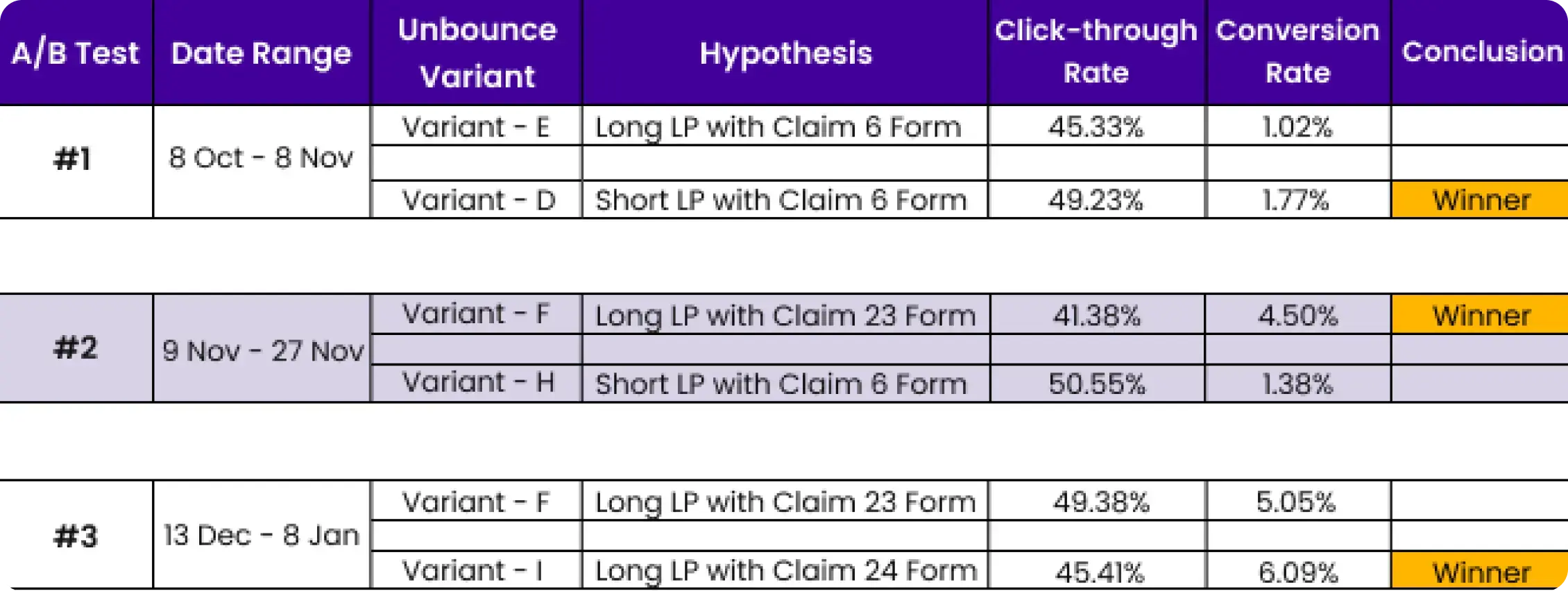
- We used heatmap data and session recordings to identify that users were scrolling past the form — a classic UX friction signal that pure analytics would have missed.
- The A/B test validated the hypothesis. Strategic form repositioning improved lead quality without sacrificing volume.
Ready to Integrate CRO and UX?
We will audit your landing pages for UX friction and conversion leaks, then build a prioritised test roadmap using the EPIC framework, free of charge.
Book a Free CRO + UX Audit →What you should do now
Found this helpful? Here are more ways we can help:
- Get a free UX + CRO audit
We will review your landing pages for UX friction and conversion leaks, then give you a prioritised action plan. Book a call to get started.
- Read more about CRO
Our Complete Guide to CRO covers the full optimisation process, and our CRO Consultant Guide helps you decide when to bring in help.
- See our results
Our case studies show how UX-driven CRO has lifted conversion rates by 40-150% across SaaS, healthcare, finance, and e-commerce.
Frequently asked questions
CRO (conversion rate optimization) focuses on increasing the percentage of visitors who complete a desired action — filling out a form, booking a demo, making a purchase. UX (user experience) focuses on making the overall journey smooth, intuitive, and satisfying. They overlap heavily: good UX almost always improves conversions. The difference is that CRO adds a measurement and experimentation layer that pure UX work often does not.
Technically yes, but you will be guessing. CRO without UX research means running A/B tests based on assumptions rather than observed user behaviour. You might test the wrong things or miss the real friction points entirely. UX research — heatmaps, session recordings, user interviews — tells you WHERE users struggle. CRO then tests solutions to those specific problems.
Most CRO programmes start showing measurable results within 2-3 months, assuming enough traffic for statistically significant tests. The UX research phase (Step 1) typically takes 2-4 weeks. The first round of hypothesis testing takes another 4-6 weeks. Meaningful compounding results usually emerge by month 3-4.
The standard toolkit in 2026 includes GA4 for analytics, Hotjar or Microsoft Clarity for heatmaps and session recordings, VWO or Optimizely for A/B testing, and Looker Studio for reporting. For deeper UX research, add Wynter or UserTesting for qualitative feedback and Maze for unmoderated usability tests.
Ideally yes, or at least tightly integrated. When CRO and UX sit in separate teams, you get a common dysfunction: UX designers create beautiful experiences that are never validated with data, and CRO specialists run tests on surface-level changes without understanding the underlying user journey. The best results come from a single team or agency that does both.
It depends heavily on your industry, traffic source, and what you are converting. B2B SaaS demo pages typically convert at 3-8%. E-commerce product pages average 2-4%. Landing pages built for paid campaigns should target 5-15%. Rather than chasing a benchmark, focus on improving YOUR current rate through structured testing.
View all sources
Cart Abandonment Rate Statistics 2026baymard.com
Page Load Time Statisticsthinkwithgoogle.com
Core Web Vitals and Google Searchdevelopers.google.com
How to Improve UX to Increase Conversionscontentsquare.com
UX Best Practices That Improve Conversion and Retentionconvert.com
Conversion Rates: Definition as Used in UXnngroup.com

Waseem founded Apexure in 2015 and has led its work on 3,000+ pages for 300+ clients since. He writes about what the team sees after the click, which is pages, forms, tracking and the systems behind them.