Most landing pages we audit have video in the wrong place. Either it autoplays and annoys people, it loads 800KB of JavaScript and tanks page speed, or it sits below the fold where nobody scrolls to find it. When video is placed well, it works. EyeView Digital found conversion lifts of 34-86%, and 38.6% of marketers now call video the most effective element on their landing pages (Firework, 2024). But “add a video” is not a strategy. Where you put it, how it loads, and what it actually says matters more than whether it exists. We’ve tested video on SaaS demo pages, e-commerce product pages, and lead generation funnels. Here is what actually worked, and what didn’t.
What is a video landing page?
A video landing page is any landing page that uses video as a core content element to communicate the offer, build trust, or drive conversions. The video can be:
- A hero video replacing or accompanying the main headline
- An explainer video walking through the product or service
- A testimonial video with a real customer sharing their experience
- A product demo showing the product in action
- A background video creating atmosphere and visual interest The key distinction: on a video landing page, the video is doing a job. It is not decoration.
Four video types for landing pages, each serves a different conversion purpose. Match the type to your page goal.
8 video landing page examples
These come from projects we have actually built. Some worked immediately. Others needed iteration.
1. Homepage hero video: the contractor consultants
We built a homepage for The Contractor Consultants with a hero video that explains their unique hiring model for construction companies. The video covers their no-contract flexibility, pricing, and end-to-end service, all in under 90 seconds.
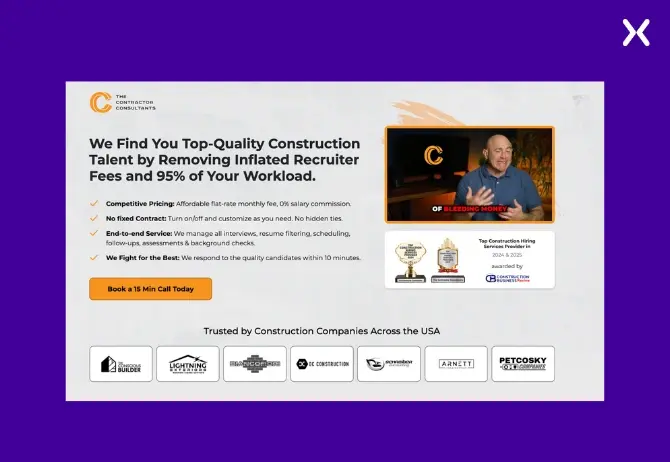
Construction company owners do not read long service descriptions. This video covers everything in 90 seconds, click-to-play, hero section, straight into a consultation booking CTA.
2. Podcast-to-Landing-Page video: dr. Steven g
For Dr. Steven G, we repurpose his long-form podcast episodes into short clips embedded on his landing pages. Each clip focuses on one health topic, making complex chiropractic concepts accessible in 60-second segments.
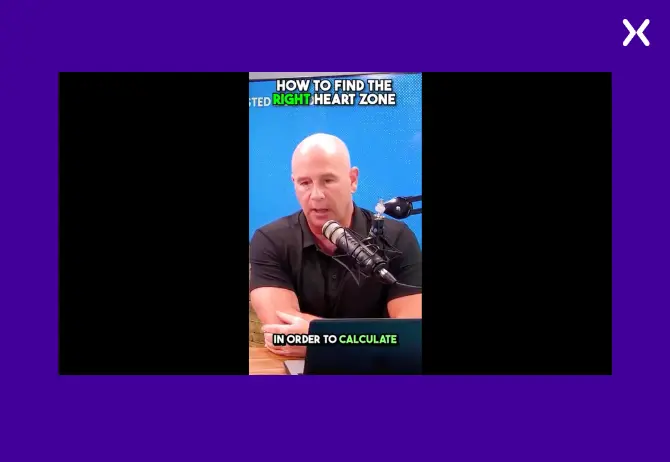
Podcast clips work because they are not scripted. Visitors see a real practitioner explaining their approach, not an actor reading a marketing brief. These clips drive quiz completions and consultation bookings because they feel like advice, not advertising.
3. Blog-Embedded q&a video: ARB accountants
For ARB Accountants, we embedded a video Q&A session on their blog post about HMRC tax investigations. The video answers frequently asked questions directly, complementing the written content.
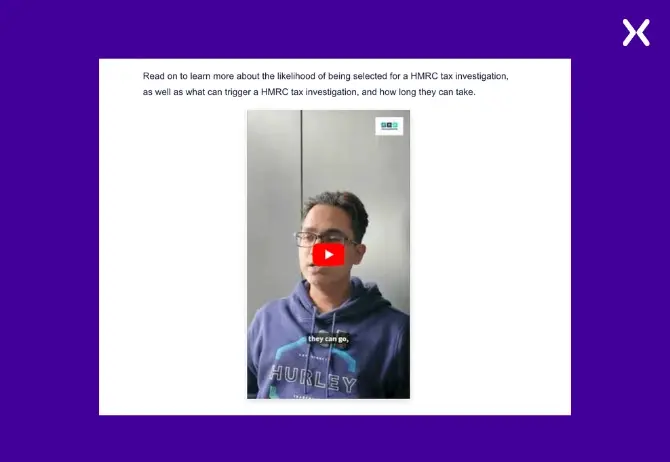
Results after embedding the video:
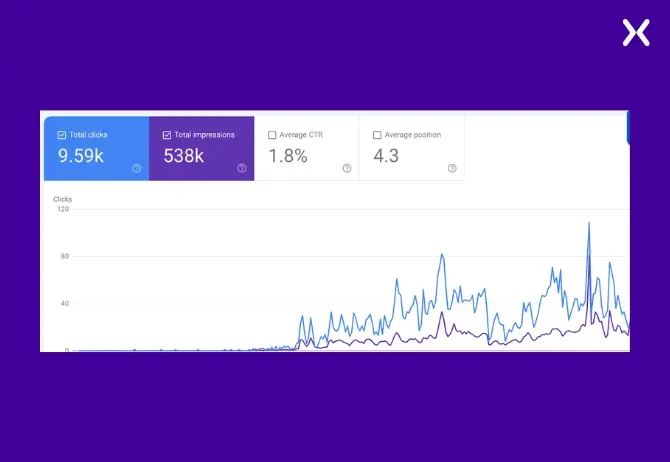
The video covers the same ground as the written post but catches people who would rather watch than read. Time on page went up, and so did consultation bookings. Dual-format content is underrated.
4. Product demo video: ACTIVE cleaning products
For ACTIVE, we integrated short product demonstration videos on their e-commerce landing pages. Each video shows the product solving a real cleaning problem in real time.
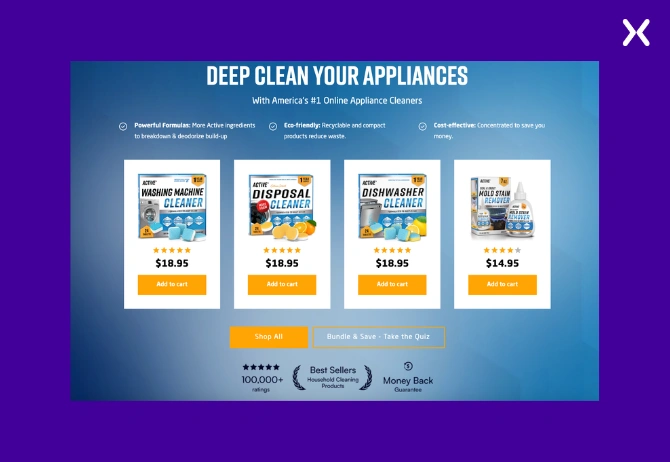
No amount of copy will convince someone a cleaning product works as well as watching it dissolve buildup in 30 seconds. These demos sit on product landing pages right next to the purchase CTA, where doubt is highest.
5. Conversion-Driven quiz video: dr. Steven g (health reset)
Beyond blog content, we use video on Dr. G’s landing pages to drive visitors toward taking a health assessment quiz. The video introduces the quiz concept and explains what they will learn from their results.
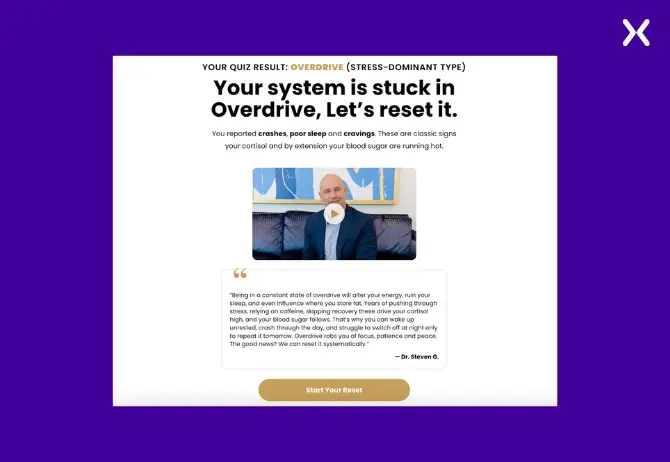
People are reluctant to start a quiz when they don’t know what they’ll get out of it. The video shows them. Quiz completion rates improved because visitors could see the payoff before committing.
6. Data-Driven YouTube strategy: waseem bashir channel
We use a data-driven approach for the Apexure YouTube channel, tracking engagement metrics, watch time, and audience retention to continuously refine video content. The best-performing videos are then embedded in relevant blog posts across the Apexure site.
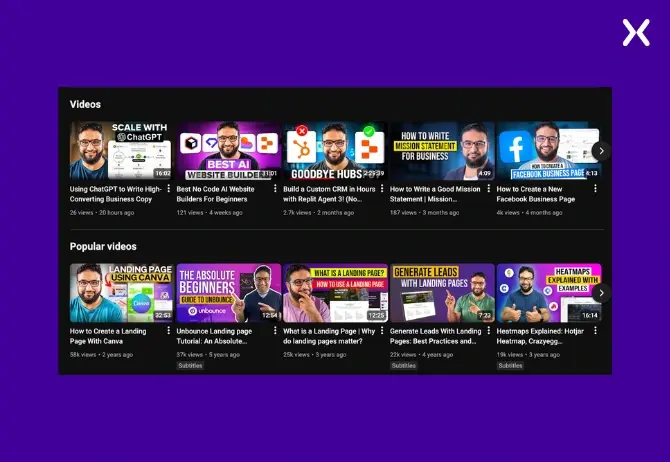
We stopped guessing which video topics to cover and started looking at the data. The videos that perform best (landing page teardowns, heatmap walkthroughs) get embedded into the blog posts they relate to. The ones that underperform teach us what to stop making.
7. SaaS demo landing page video
For SaaS demo pages, an explainer video above the fold dramatically reduces the need for lengthy feature descriptions. The visitor watches a 60-second overview and decides whether to book a demo, faster than reading through feature bullets.
Why it works: SaaS products are often complex. A visual walkthrough eliminates the “I don’t quite understand what this does” objection that kills demo conversions. This approach worked for clients like Therapy Brands (TheraNest) and Flare.io.
8. Webinar registration page video
For webinar landing pages, a short teaser video featuring the speaker builds anticipation and trust. Visitors see who they will be learning from before committing their time.
Why it works: Webinar registration pages with a speaker video consistently outperform text-only versions. The video humanises the event and gives visitors confidence that the content will be worth their time.
See our workApexure Landing Page Portfolio, 117 real projects including video-led pages→
Where to place video on a landing page
Video placement matters as much as the video itself. The wrong position can hurt conversions instead of helping them.
| Position | Best Video Type | When to Use | Watch Out For |
|---|---|---|---|
| Hero section (above fold) | Explainer, background | When video IS the primary pitch | Must not push CTA below fold |
| Below headline | Explainer, demo | When headline + video work together | Keep video under 90 seconds |
| Near CTA | Testimonial | When trust is the conversion barrier | Don't distract from the CTA |
| Features section | Product demo | When features need showing, not telling | One video per feature, not a long montage |
| Below fold | Case study, deep dive | For engaged visitors who scrolled | Lazy-load to protect page speed |
The #1 rule: video should support the CTA, not compete with it. If your video is so engaging that visitors watch it and leave without converting, the placement is wrong, move the CTA closer to the video or add a CTA overlay at the end.
"I'll give them basic design ideas and they will run with it and make it better than expected."
Best practices for video landing pages
1. Keep videos short
On landing pages, shorter is better. Aim for:
- 15-30 second loops
- 30-60 seconds
- 60-90 seconds
- 1-3 minutes maximum Save anything over two minutes for YouTube. Landing page visitors are deciding, not studying.
2. Do not autoplay with sound
Autoplaying video with sound is the fastest way to make visitors leave. If you use autoplay, mute it. For explainer and testimonial videos, use click-to-play with a strong thumbnail.
3. Protect Page Speed, The #1 Risk
Video is the biggest page speed risk on any landing page. A video element can become the Largest Contentful Paint (LCP) element, and only 62% of mobile pages pass Google’s LCP threshold of 2.5 seconds (2025 Web Almanac). Sites passing all Core Web Vitals see 24% lower bounce rates.
- Use
lite-youtubeor facade patterns for YouTube embeds, loads a thumbnail first, player only on click - Lazy-load all videos below the fold with
loading="lazy" - Host background videos as compressed MP4 (under 2MB for a 15-second loop)
- Never let a video iframe block the critical rendering path
- Test page speed WITH the video loaded, not just the HTML skeleton
Why facades matter: A standard YouTube embed loads ~800KB of JavaScript on page load, even before the visitor clicks play. The lite-youtube-embed facade (by Paul Irish) loads a static thumbnail instead and only fetches the YouTube player when clicked. It is 224x faster than a native embed. Implementation is simple:
<!-- Instead of a heavy iframe -->
<lite-youtube videoid="YOUR_VIDEO_ID" loading="lazy"></lite-youtube>
This is what we use across all Apexure blog posts and client pages. The INP (Interaction to Next Paint) metric, which replaced FID in March 2024, also benefits, since heavy video players degrade interaction responsiveness.
4. Include captions and transcripts
Many visitors watch video without sound, especially on mobile. Always add captions or subtitles. Beyond accessibility, captions directly improve SEO. Google’s Search Central documentation states that providing transcripts via WebVTT “dramatically improves Google’s ability to understand and index your video content.” If you want your video to be discovered through Google Video search, a text transcript is one of the strongest signals you can provide. It gives Google crawlable text content tied to the video.
5. Add a clear CTA after the video
Every landing page video should lead somewhere. Options:
- End screen with a CTA button
- Text CTA immediately below the video
- Sticky CTA that appears after video plays
- Click-to-call button on mobile
6. A/b test video vs no video
Video does not improve every page. We’ve removed video from pages where it was actively hurting conversions because the video was slowing load time or distracting from a simple offer. Always run an A/B test before committing. We use the EPIC framework to decide which tests to run first.
After adding video content to key blog pages and optimising the full site experience, ARB Accountants saw dramatic organic growth, proving that video combined with strong page design moves real business metrics.
Video SEO: what Google requires in 2026
Google changed how it indexes video in search results. Most landing page guides have not caught up.
Video must be the main content
Google now only shows videos in Video mode and video carousels when the video is identified as the primary content of the page. Pages where video is supplementary, such as blog posts with an embedded video or product pages with a complementary demo, are less likely to earn video rich results. This means there are now two distinct strategies:
- Video landing pages (video IS the page), eligible for video rich results, video carousels, and Video tab placement
- Landing pages with video (video supports the page), the video improves engagement and conversions but will not appear separately in Google’s video results Both are valuable. But if you want video-specific SERP visibility, the video must be the hero, not a sidebar element.
Add VideoObject schema markup
If your landing page has a prominent video, add VideoObject structured data to make it eligible for video rich results. Google requires:
- The video must actually be embedded and playable on the page (schema without a real video is a policy violation)
- A valid thumbnail URL
- The video must not be hidden behind other elements
You can combine
VideoObjectwithProductschema on product demo pages. This tells Google the video has a specific product, improving both video and product visibility.
For product demo videos, combine VideoObject + Product schema to help both the video and product rank. For testimonial videos, combine VideoObject + Review schema.
Not sure why your landing page isn't converting?
Send us the URL. We record a short video showing what is costing you conversions and email it back within three working days.
When video hurts landing page conversions
Every guide tells you video boosts conversions. Fewer mention when it actively damages them. Here is what we have seen go wrong.
Video hurts when it slows the page below the 2.5-second LCP threshold. On one client page, adding a YouTube embed without a facade pushed load time from 1.8s to 4.2s. Bounce rate went up 35%. Conversions dropped. Switching to lite-youtube-embed brought page speed back to 1.9s. Same video, same position, completely different outcome.
Video hurts when it replaces the headline. If the only way to understand the offer is to watch a video, visitors on slow connections, in sound-restricted environments, or with screen readers cannot access your pitch. The headline must always carry the core message independently.
Video hurts when it is generic. A stock “about us” brand video on a PPC landing page targeting a specific keyword dilutes message match. The video must reinforce the same intent as the ad that brought the visitor there.
Video hurts when it pushes the CTA below the fold. If adding a 400px-tall video player means the visitor has to scroll past it to find the form or button. You have traded engagement for friction. Either reduce the video size, move it below the CTA, or use a thumbnail-only approach that expands on click.
Video hurts when you test wrong. Teams test “video vs no video” as a binary, but the real variables are video type, length, position, and autoplay behaviour. A failed test does not mean video does not work. It means that specific implementation did not work. Use your A/B testing framework to isolate one variable at a time.
Common video landing page mistakes
These mistakes silently kill video landing page performance:
-
Video replaces the headline. The headline must stand on its own, video supports it, not replaces it. If the video fails to load, the page must still communicate the offer.
-
Autoplay with sound. Instant bounce trigger. Always mute autoplay or use click-to-play.
-
Video pushes CTA below fold. If adding video means the CTA button disappears below the fold, the video is hurting conversions. Rethink the layout.
-
Uncompressed video files. A 50MB hero video destroys page speed. Compress, use adaptive bitrate, and consider a CDN.
-
No fallback for slow connections. If the video takes 5 seconds to load, what does the visitor see? Show a strong static image as a poster frame while the video loads.
-
Same video on every page. Match the video to the page’s specific purpose. A generic brand video on a PPC landing page wastes the opportunity for a targeted message.
Video landing page vs static landing page
| Aspect | Video Landing Page | Static Landing Page |
|---|---|---|
| Engagement | Higher, multi-sensory | Lower, text + image only |
| Message retention | Higher recall (multi-sensory) | Lower recall (text-only) |
| Page speed | Risk if not optimised | Faster by default |
| Mobile experience | Needs careful sizing | Simpler responsive design |
| Production cost | Higher (video creation) | Lower (copywriting only) |
| Best for | Complex offers, trust-building, demos | Simple offers, fast decisions |
| SEO impact | Longer time on page, video schema | Faster load, cleaner crawl |
Not every landing page needs video. Use video when the offer is complex, trust is a barrier, or the product needs to be seen in action. For simple lead gen with a clear offer, a well-written static landing page can outperform a video page.
Frequently asked questions
Does video on a landing page increase conversions?
Yes, research from EyeView Digital found that video can increase landing page conversions by 34-86% depending on implementation quality. A 2024 Firework survey found 38.6% of marketers say video is the most effective element for landing page conversions. However, the video must be relevant to the page goal, properly placed, and optimised for page speed. A poorly implemented video can actually hurt conversions by slowing load times.
What is the best video length for a landing page?
For landing pages, keep videos between 30 and 90 seconds. Background/ambient videos should loop at 15-30 seconds. Product demos can extend to 1-3 minutes. Save longer content for YouTube or blog embeds, landing page visitors are in decision mode, not learning mode.
Should landing page videos autoplay?
It depends on the type. Background/ambient videos can autoplay muted. Explainer and testimonial videos should be click-to-play, autoplay with sound causes immediate bounces. Always provide a strong thumbnail that encourages the click.
How does video affect landing page speed?
Video is the biggest page speed risk on landing pages. Use lazy loading, lite-youtube facades for YouTube embeds, compressed MP4 files (under 2MB for short loops), and never let video iframes block the critical rendering path. Test your page speed with the video loaded, not just the HTML.
What type of video works best on landing pages?
It depends on your goal. Explainer videos work best for SaaS and complex services. Testimonial videos build trust for B2B and high-ticket offers. Product demos drive conversions for e-commerce. Background videos create atmosphere for brand and lifestyle pages. Match the video type to the conversion barrier you need to overcome.
Where should I place video on a landing page?
The best placement depends on the video type. Hero explainers go above the fold alongside the headline. Testimonials work best near the CTA where trust matters most. Product demos sit in the features section. The key rule: video should support the CTA, not push it below the fold or compete with it for attention.
Ready to build a video landing page that converts?
Video works when it has a job. It fails when it is decoration. The difference is almost always in the implementation, not the idea. We have built video landing pages for The Contractor Consultants, Dr. Steven G, ARB Accountants, and ACTIVE. In some cases the video doubled engagement. In others, we pulled it because it was hurting more than helping. Both outcomes are useful if you are testing properly.
Get a Video Landing Page Built by Experts
Tell us about your campaign. We will design and build a video landing page that converts, with the right video type, optimal placement, and bulletproof page speed.
Get Started →What you should do now
- See real video landing pages
Browse our portfolio of landing page projects — including video-led pages, product demos, and homepage hero videos.
- Get expert help
Want a video landing page designed for conversions? Book a call with one of Apexure’s CRO experts.
- Learn more
Read our complete guide to high-converting landing page design.
View all sources
Google Video SEO Best Practicesdevelopers.google.com
Video Must Be Main Content for Video Modesearchengineland.com
lite-youtube-embed, Paul Irishgithub.com
Best Practices for Third-Party Embedsweb.dev
Landing Page Statistics (2026)backlinko.com
Average Conversion Rates (Q4 2024)unbounce.com
Landing Page Statistics (2024)firework.com
Core Web Vitals Guide (2026)nitropack.io
AI Overviews Study (2025)semrush.com

Waseem founded Apexure in 2015 and has led its work on 3,000+ pages for 300+ clients since. He writes about what the team sees after the click, which is pages, forms, tracking and the systems behind them.
 Safe Place Bedding
 Peak Financial
 Chicken Dinner
 The Coherence Coach
 YVRBet Existing Business
 YVRBet Aspiring Entrepreneurs
.webp)