
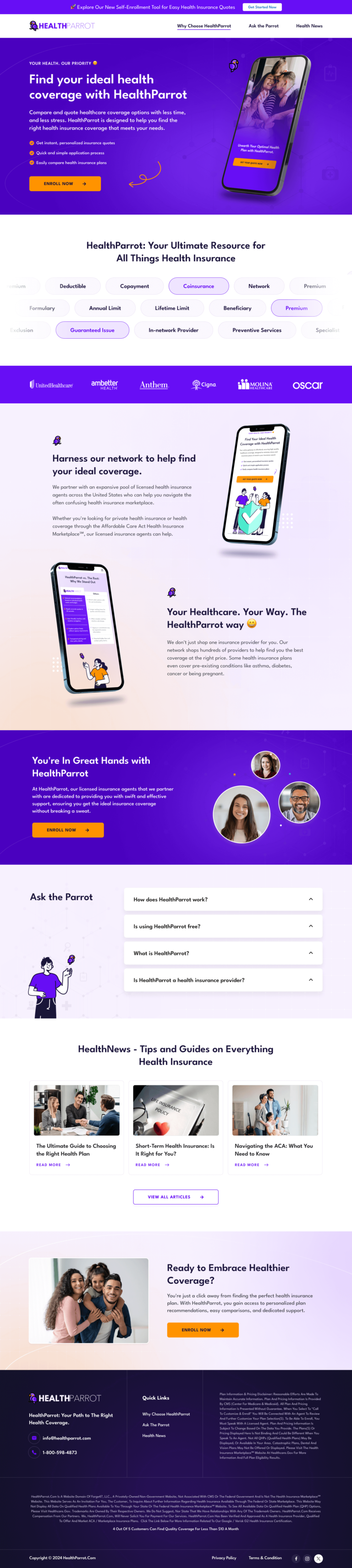
Borrowed trust from five carrier logos in the hero.
HealthParrot's Unbounce comparison page for self-directed insurance buyers who find the category confusing. The 'Ask the Parrot' FAQ, purple in a blue category, and the privacy line we would put by the button.
- Primary CTACompare Plansthe button the page is built around
- GoalLead Generationwhat counts as a conversion
- PlatformUnbouncelead generation page
- Built forB2CInsurance
- The page as built, not a mockup.Analysed by Apexure, not by HealthParrot.
- Client
- HealthParrotInsurance
- Industry
- Insurance5 examples
- Audience
- B2CLead Generation
- Platform
- Unbounce132 examples
- Page type
- Lead generationLead Generation
- Analysed by
- Waseem BashirMarch 2026
What the page does, and why
Why this page was built
HealthParrot competes in the health insurance comparison market, a category with high consumer anxiety, complex product differentiation, and multiple established players. The platform needed to communicate that it could simplify a notoriously confusing purchasing process while giving consumers access to the same carriers they’d find through broker channels.
The landing page had to establish trust quickly, make the comparison value clear, and reduce the friction to starting a plan evaluation.
Design decisions
The purple gradient hero with bold white headline creates immediate visual differentiation from the blue-dominant insurance category. The colour choice isn’t arbitrary. It signals that HealthParrot is a technology-forward comparison platform, not a traditional broker, which matters for the audience of self-directed insurance buyers who prefer digital research to agent calls.
The carrier logo bar, AmBetter, Anthem, Cigna, Molina, Oscar, is the page’s trust anchor. These are names consumers recognise from employer benefits packages, open enrolment materials, and healthcare provider networks. Displaying them near the hero associates HealthParrot with established institutions rather than positioning it as a standalone unknown.
The ‘Ask the Parrot’ FAQ section does the heavy lifting of the page. Insurance comparison generates specific anxiety-driven questions that, if answered clearly, directly accelerate the decision to compare plans. The branded format makes the FAQ feel like a product feature rather than a generic support section, communicating that answering questions is what HealthParrot does best.
The icons representing plan comparison dimensions, network coverage (prescription costs, specialist access, emergency care) give visitors a visual taxonomy of what ‘comparison’ means in practice. When visitors understand that HealthParrot compares specific, meaningful dimensions rather than just listing plans, the platform’s value proposition becomes concrete.
The gradient background keeps the page visually engaging without requiring photography, which is appropriate for an insurance category where stock photography of smiling families is clichéd and visually indistinguishable. A well-executed gradient communicates digital product quality more honestly than generic imagery.
The parrot mascot is doing more conversion work than it might initially appear. Insurance is an anxiety category. It's genuinely stressful. A friendly, approachable brand identity signals that the experience of using this platform will be less painful than the typical insurance research process. Mascots in high-anxiety categories consistently improve engagement and reduce bounce because they lower the emotional temperature of the interaction.
Trust architecture
Layer one: carrier recognition
AmBetter, Anthem, Cigna, Molina, and Oscar are trusted healthcare brands. Their logos act as institutional endorsements of the platform’s carrier relationships.
Layer two: transparency through explanation
The ‘Ask the Parrot’ FAQ demonstrates platform expertise without jargon. A platform that can explain insurance concepts clearly signals that it understands the products it’s comparing, which is the core trust requirement for a comparison service.
Layer three: process clarity
A visible explanation of how the comparison process works (what data is collected, how plans are matched, what the visitor receives) removes the data-sharing anxiety that inhibits insurance form completion.

"Insurance comparison pages convert on clarity, not features. The visitor doesn't want the most full comparison. They want the one they understand. HealthParrot's plain-language FAQ and the parrot's friendly positioning signal that this platform was designed for people who find insurance confusing, not for people who already know what they're looking for. That's exactly the right target."
Read more about how we approach insurance page conversion in our guide to Landing Page Examples.
The 'Compare Plans' CTA is a neutral, product-function description, not a commitment. In insurance, any CTA that implies purchase intent ('Get Covered', 'Buy Now') triggers resistance because consumers know they don't understand enough to commit. 'Compare Plans' is the right language because it describes what the visitor wants to do before they're ready to decide anything. Lower-commitment CTAs in high-anxiety categories outperform purchase-oriented ones consistently.
Conversion strategy
The comparison form is the primary conversion action, it captures enough information to generate a personalised plan list without requiring full insurance application data upfront. The staged approach (zip code first, then household details, then contact) mirrors how insurance brokers actually have these conversations, which feels natural rather than intrusive.
The ‘Compare Plans’ CTA appears in the hero and after the FAQ section, giving visitors two opportunities to enter the comparison flow at different levels of preparation.
"The hardest conversion challenge in insurance comparison isn't getting visitors to the form. It's getting them to complete it. Privacy anxiety is real in insurance because health data feels personal. The form copy matters as much as the form design: 'We never sell your information' next to the submit button is not legal boilerplate. It's a conversion element that directly affects completion rate."
Platform: Unbounce
Unbounce’s form handling and integration capabilities connect the comparison form to downstream plan matching logic. Active text replacement allows the hero copy to adjust based on the traffic source, visitors from Medicare-specific ads see Medicare-relevant messaging; marketplace plan visitors see different copy. This personalisation significantly improves relevance and reduces immediate bounce.
Mobile experience
Health insurance research is increasingly mobile-first, particularly in the individual and marketplace segments where self-directed buyers research outside work hours. The comparison form is optimised for mobile with large input fields, number-pad-friendly fields for zip code and income, and a progress indicator for multi-step flows. The FAQ accordion is touch-friendly and quick to move through on small screens.
Insurance visitors arrive via paid search with high intent and low patience. A slow comparison form abandon at dramatically higher rates than fast ones. The gradient background is generated via CSS rather than an image file. The carrier logos are were optimised SVGs at minimal file sizes. These choices protect page speed on mobile where insurance search intent peaks during open enrolment periods when network congestion is highest.
What we’d evolve today
Three improvements to increase comparison form completion:
- Add a privacy-specific trust badge near the form: A visible ‘Your data is never sold to third-party agents’ statement directly above the submit button addresses the insurance form’s primary abandonment driver. Specific data promises outperform generic privacy policy links.
- Show a ‘Plans available in your area’ counter after zip entry: Revealing plan count immediately after zip code entry creates a hook that rewards the first form action with immediate, relevant value, which dramatically improves step two completion.
- Test a chat widget positioned as ‘Ask the Parrot’: A live or chatbot question-answering experience using the parrot brand creates an interactive version of the FAQ section for visitors who prefer guided navigation to self-directed research.
Key takeaway
HealthParrot’s page demonstrates how to build trust and drive comparison form entries in a high-anxiety insurance category. The carrier logo authority, the accessible FAQ branding, and the low-commitment CTA language work together to reduce the emotional barriers that prevent insurance comparison decisions.
Browse our full collection of landing page examples to see how we apply these principles across industries. For methodology, read our guide to Landing Page Call to Action Tips.
Waseem founded Apexure in 2015 and has led its work on 3,000+ pages for 300+ clients since. He writes about what the team sees after the click, which is pages, forms, tracking and the systems behind them.
What the page leans on
The principles at work on this page, each named in the analysis above.
Authority bias
People trust credible experts. Certifications, awards, media mentions, and expert endorsements boost credibility.
Social proof
People follow the actions of others. Testimonials, reviews, and client logos build trust and reduce hesitation.
Visual hierarchy
Controlling what visitors see first, second, and third guides them toward the conversion goal.
Cognitive load reduction
Simpler pages convert better. Reducing visual noise, breaking forms into steps, and clear copy lower mental effort.
What people ask about pages like this
Insurance buyers buy from brands they recognise and trust, not from aggregators. By displaying AmBetter, Anthem, Cigna, Molina, and Oscar in the hero section, HealthParrot positions itself as the gateway to carriers the visitor already trusts, rather than as a new entity asking for personal data. The carrier logos are borrowed authority: the visitor's trust in Cigna or Anthem transfers to HealthParrot as the platform that connects them to those plans.
Health insurance purchasing is driven by anxiety and confusion. Most people don't understand the difference between deductibles, copays, and out-of-pocket maximums. The 'Ask the Parrot' branded FAQ format humanises the complexity by making question-answering the product's core value. When the FAQ section answers questions visitors are actively carrying, 'What's covered?', 'Can I keep my doctor?', 'When does coverage start?', the platform demonstrates value before the visitor has even entered their first piece of personal information.
Health insurance is a category dominated by blue, the default colour of trust, stability, and corporate healthcare. Purple stands out from every competitor at a glance while still communicating confidence and quality. The parrot brand mark adds a memorable visual identity that differentiates the platform in a category where most aggregators are visually indistinguishable. Colour differentiation is the cheapest brand investment available on a landing page.
The entry form should ask only what's necessary to generate a personalised comparison: zip code, household size, and approximate income. Each additional field beyond these three reduces form completion rates without improving lead quality enough to justify the friction. The detailed health history, employment status, and plan preferences belong in a multi-step flow after the visitor has seen that the platform has plans relevant to them. Show value first; collect detail second.
Three more, taken apart the same way

Want one like this?
Tell us what the page has to do and where the traffic comes from. Within 48 hours you get a written quote from the people who wrote this breakdown. Already have a page that is not converting? Send it for a free audit instead.
UK hours, which is the East Coast morning.
"Health insurance pages have the highest anxiety-to-trust deficit of any consumer category. People know they need coverage. They're confused about their options, and they're worried about making the wrong choice. The page's job is to convert that anxiety into action. The carrier logos do that faster than any copy, they say 'we connect you to plans you already recognise', which removes the 'who is this company?' fear before it forms."