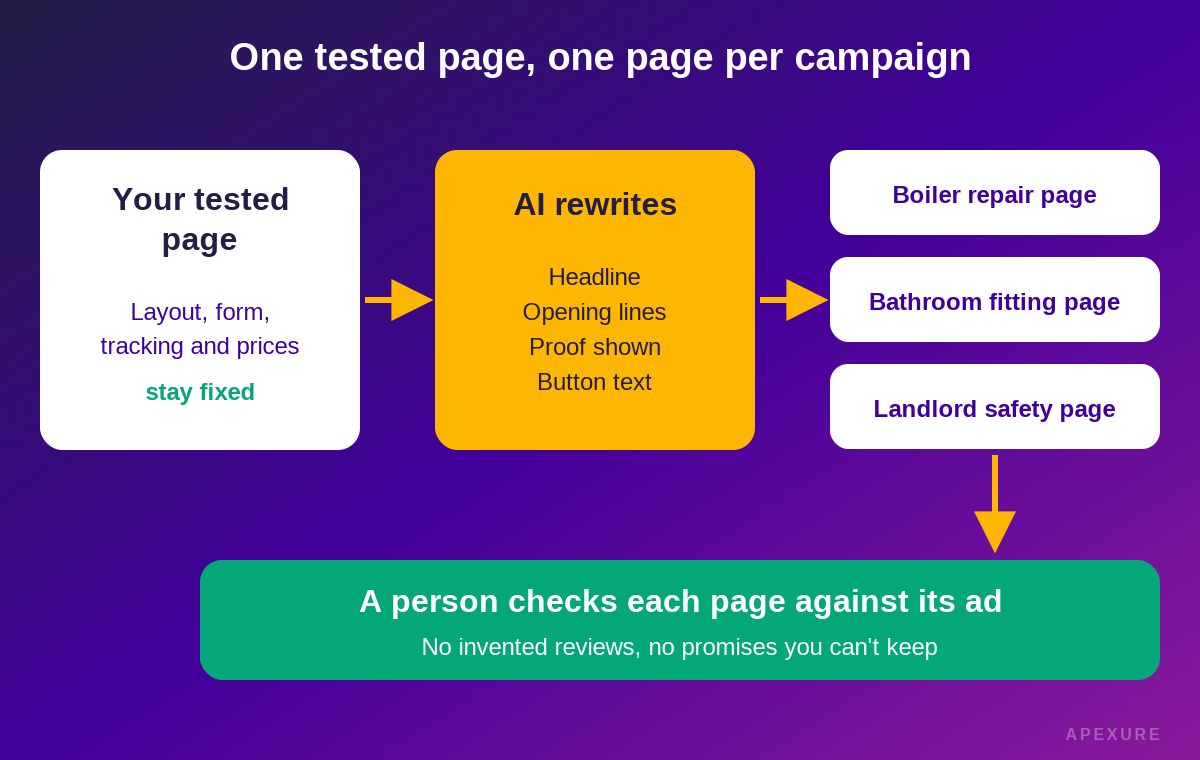
Yes, and it’s one of the better uses of AI in paid ads. Don’t ask it to design a new page for every campaign. Start from one landing page that already works, and let AI rewrite the parts that should match each ad: the headline, the opening lines, the proof and the button. The layout, the form and the tracking stay the same. A person reads every version before it goes live, because AI will happily promise things your team can’t deliver.
That last step is where most of the risk sits, and I’ll come back to it. First, the reason to bother.
Why each campaign wants its own page
Someone who clicks an ad for “emergency boiler repair” and lands on a page about “heating services” has to work out whether they’re in the right place. Plenty of people don’t bother. They go back and click the next ad.
Google says much the same in its own help pages. Its advice on Quality Score is to “choose a landing page that closely matches your ad and keywords”, and it gives the example that if your ad offers a discount, people “should be able to find and buy shoes at that discounted price on your landing page” (Google Ads Help). Google defines landing page experience as “how relevant and useful your landing page is to people who click your ad” (Google Ads Help). So a closer match helps with Google’s scoring as well as with the visitor. Our list of dos and don’ts for a paid search landing page covers the rest of what Google looks for.
The trouble has always been the work. A firm running eight campaigns rarely has time to write and build eight pages, so everything points at the homepage or one general services page instead of a proper campaign landing page. AI cuts the writing part down to minutes per campaign. Here is the whole idea in one picture.
When a separate page is worth it, and when it isn’t
A separate page earns its keep when the campaigns are aimed at different people or different jobs. A plumbing firm advertising boiler repair, bathroom fitting and landlord safety certificates has three sets of buyers with three different worries. A recruitment firm running ads for warehouse staff and for finance roles is in the same position.
It isn’t worth it when the campaigns are near copies of each other. Five ad groups that all sell the same service in the same town with slightly different keywords can share one page. Splitting them gives you five pages to keep up to date and too little traffic on each to learn anything from.
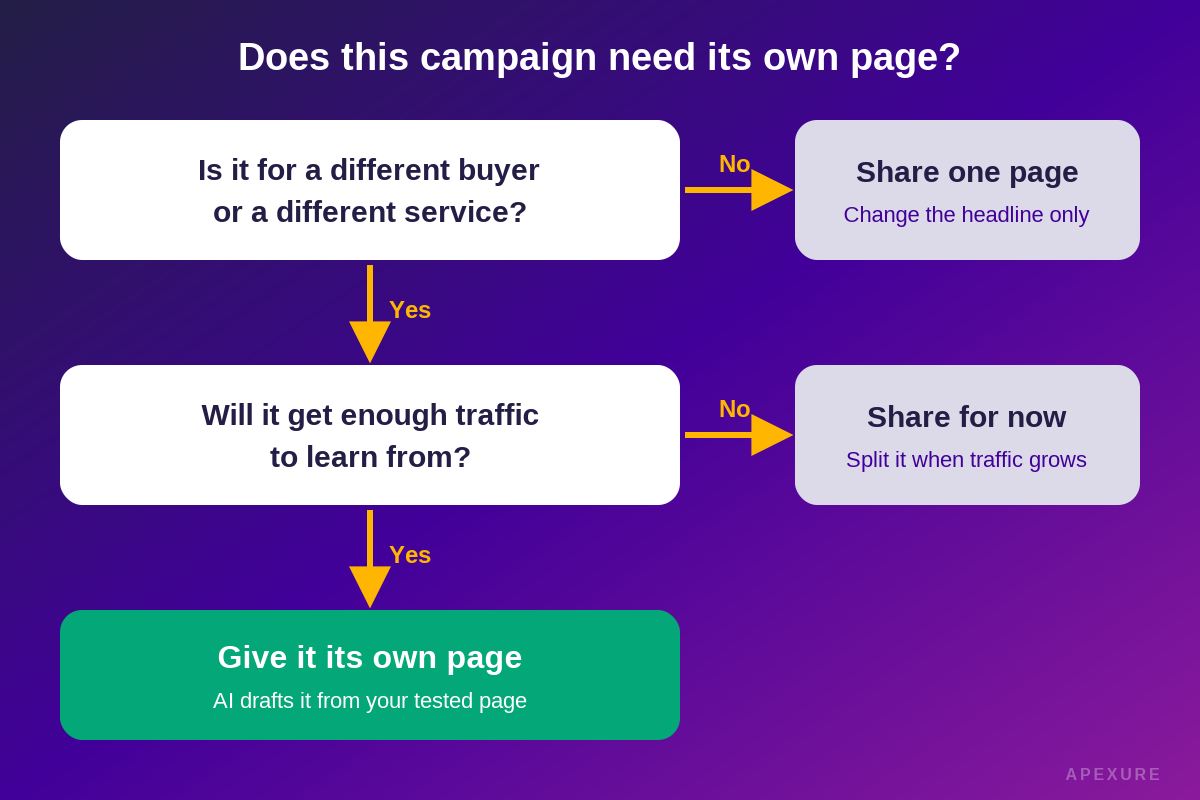
My rule of thumb: one page per different buyer or service, not one page per ad group. I gave the same advice in my video on how many landing pages you need, about a consulting firm we worked with: “When we worked with a consulting firm, we created specific landing pages for each of their targeting campaigns like custom software development and UX consulting.” Two services with different buyers, so two pages. The whole video is below.
How many landing pages do I need?
Before you build a page per campaign, watch this. I go through the audiences, services, campaign goals and traffic that decide how many pages are worth having.
What AI should change, and what it should leave alone
Treat your best page as a template. Some parts change by campaign and some never do.
That split matters because it means a new page is a new set of words on a page you trust, and you’re not taking a fresh gamble every time.
What this looks like on a real build
We’ve built more than 3,000 pages since Apexure started in 2015, and the campaign setups that hold up share one idea: a proven layout, with the words and pictures changed for each campaign. For Chorus, a music tech platform, we built one modular Unbounce layout that becomes a branded page for each artist’s fan club.
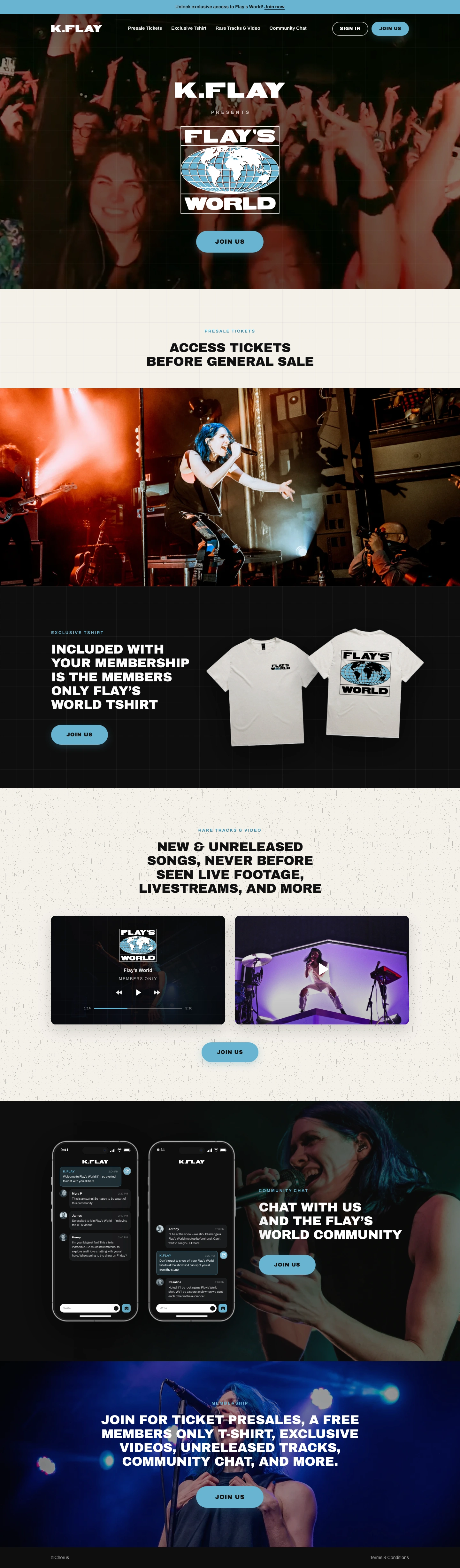
That’s a K.Flay page from our portfolio. Every Chorus page has the same structure and one call to action, joining the club, while the images and copy belong to that artist. A new artist didn’t mean a new design project. With the layout settled like that, only the words change, and that’s the part AI speeds up.
Chorus: one layout, a page for every artist
Chorus lets artists launch paid fan clubs without code. We built its brand site on Webflow and one modular Unbounce layout that becomes a branded page for each artist's fan club, so Chorus can run several campaigns at once from one design.
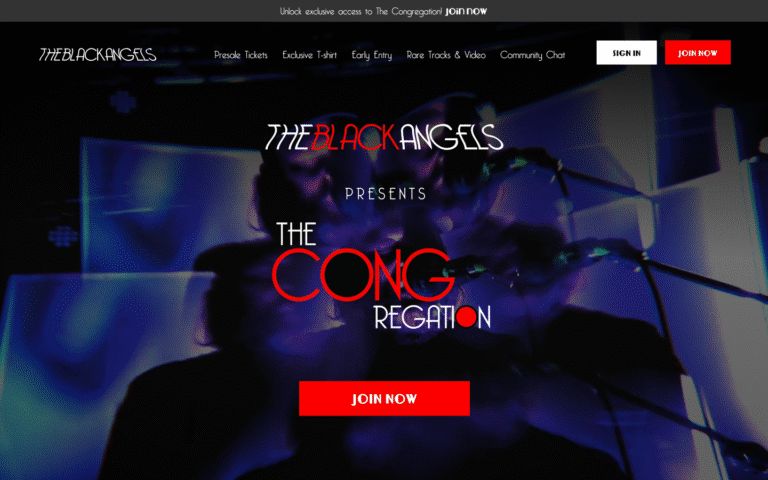
- One modular Unbounce layout that becomes a branded page for each fan club.
- One call to action on every page: join the club.
- A new artist page doesn't mean a new design project.
- The Chorus team edits the Webflow site without waiting on a developer.
Building the pages, step by step
The work splits into six steps. Only the second one is AI’s. Open each step for the detail.
Six steps from one page to one page per campaign
Add the two or three real reviews that fit that buyer best. This sheet is the only thing AI is allowed to draw on besides your page.
One campaign at a time. Tell it plainly not to add figures, guarantees or timelines that aren't already in the brief or the page.
If the ad says same-week installation and the page doesn't, fix the page. If the page promises something the ad doesn't and you can't keep it, cut it.
Many page builders now have AI copy features built in. The brief and the checking still come from you.
The pages exist for ad traffic. A dozen near-identical pages about the same service do your organic search no good.
Check the form fires your conversion tracking and reports under the right campaign.
A prompt that works for step two: “Here is our landing page and a campaign brief. Rewrite only the headline, the first three sentences, the button text and the FAQ so they match this campaign. Use only facts in the brief and the page. Do not add figures, guarantees or timelines that aren’t already there.”
What goes wrong
It invents proof. Ask for “a testimonial from a landlord” and some assistants will write one. Every review on the page has to be a real one you have permission to use.
It overpromises by sector. AI knows that “24/7 emergency call-outs” is a common line for trades. It doesn’t know whether you actually answer the phone at 2am.
The pages drift. Six months on, you’ve changed your prices or your form on the main page and four campaign pages still show the old version. Keep a list of every campaign page and update them together.
Tracking breaks quietly. A copied page sometimes loses its tracking code, or reports enquiries under the wrong campaign. Then you end up judging campaigns on numbers that are wrong. If you’re not sure your enquiries are counted properly, sort out conversion tracking before you build more pages.
Not sure where AI fits in your business?
How to tell if it’s working
Compare enquiries, not clicks. Run the new campaign page against the old general page for a few weeks and count the quote requests or booked calls each one brings in. Give it enough traffic before you call it.

Balance the number of landing pages with the traffic you can drive to them. Effective AB testing requires enough visitors to provide meaningful data.
Waseem Bashir
Founder and CEO, Apexure
That’s from the same video, at the point where I talk about traffic. Read the enquiries too. A page that matches the ad often brings better-fit enquiries before it brings more of them. A home loan lender we built two campaign pages for, each with a short survey added to its form, said as much in their Google review: the pages “greatly increased our number of leads, but also our quality of information.” Knowing what to measure matters as much as the page, as a financial services client put it:
“the Apexure team created a excellent landing page for my FB ads campaign and helped me understand what metrics to look at to see what converts better and what information we could test to get better results.”
A financial services client, in their Upwork review
Change one thing at a time on each page, and write down the date. On a quiet campaign it can take several weeks to see a difference.
Where Apexure fits
A matching page gets the enquiry. What happens next decides whether it turns into work: how quickly the person hears back, whether the quote goes out the same day, and whether anyone chases the ones who go quiet. A good campaign page followed by a slow reply still loses the lead, and following up every new lead within minutes is a job an AI agent can take on properly.
If you’d like to know which jobs AI could take on in your business, book a free AI review. It’s a 30-minute call, and within 48 hours you get a written list of the three jobs AI could take off your plate first. Our services page sets out what we build and run.
Questions owners ask
Will lots of similar landing pages hurt my SEO?
Not if you keep them out of the index. Add a noindex tag to campaign pages so Google’s organic results only show your main service pages. The ads can still send people to them.
How many landing pages do I need for my ads?
One for each distinct buyer or service you advertise, as a starting point. If two campaigns would get the same page with a different headline, they can usually share. There’s more on this in how many landing pages you need.
Does this work for Facebook and LinkedIn ads too?
Yes. The idea is the same: the page should pick up where the ad left off. Our comparison of Meta ads and Google Ads landing pages covers how the two audiences differ.
Which jobs could AI take off your plate first?
A 30-minute call, then within 48 hours a written list of the three jobs AI could take on first in your business.

Waseem founded Apexure in 2015 and has led its work on 3,000+ pages for 300+ clients since. He writes about what the team sees after the click, which is pages, forms, tracking and the systems behind them.