AI automation for a small business means handing a job you repeat every week to software that can read, write and make small decisions. Start with one job, not a platform. For most firms that’s replying to new enquiries, because a slow reply loses work you’ve already paid to win. Let AI read each enquiry and draft the reply, keep a person checking what goes to customers for the first few weeks, and add the next job only once the first runs without surprises.
The jobs to hand over first
When we run a free AI review, the first job we look at is follow-up. It’s rarely the only one. These four come up most often, and each splits into a part AI should do and a part that stays with a person.
Look at the right-hand side. Prices, complaints and anything that moves money are where a wrong answer costs you a customer, so a person keeps them.
Which job comes first depends on your business
The four jobs above don’t rank the same everywhere. What costs you most when it’s slow is different in each kind of firm.
Service firms
Insurance brokers, mortgage advisers, estate agents and trades usually lose most at the first reply. Someone fills in a form at 8pm, hears nothing until the next afternoon, and has booked whoever answered first. Instant replies and booked calls come first, then chasing quotes that went quiet.
Manufacturers and distributors
These firms tend to lose at the quote. When one estimator holds every price in their head, quotes wait for them. Drafting quotes from the enquiry and the price list, and a morning list of which accounts to chase, usually come before anything customer-facing.
Agencies
Agencies lose time to client reporting and onboarding. Pulling the numbers together each month and writing the summary is a good first job, because the agency checks it before the client ever sees it.
How AI changes what you already automate
Small businesses have automated things with rules for years: when someone fills in the form, send email two. I made a video in 2021 on setting up exactly that kind of booking funnel, and the aim then is the aim now.

An automated funnel will save you time and work in the background while you focus on things you love.
Waseem Bashir
Founder and CEO, Apexure
That’s from the start of my video on automated appointment booking. Rules are good at sending the same email to everyone. What they can’t do is read. They can’t tell a homeowner with a burst pipe from a landlord asking about next spring, or answer what the person actually asked.
AI does that part. It reads the enquiry, works out what the person wants, writes a sensible reply and decides which of your rules should run next. Here’s one job end to end.
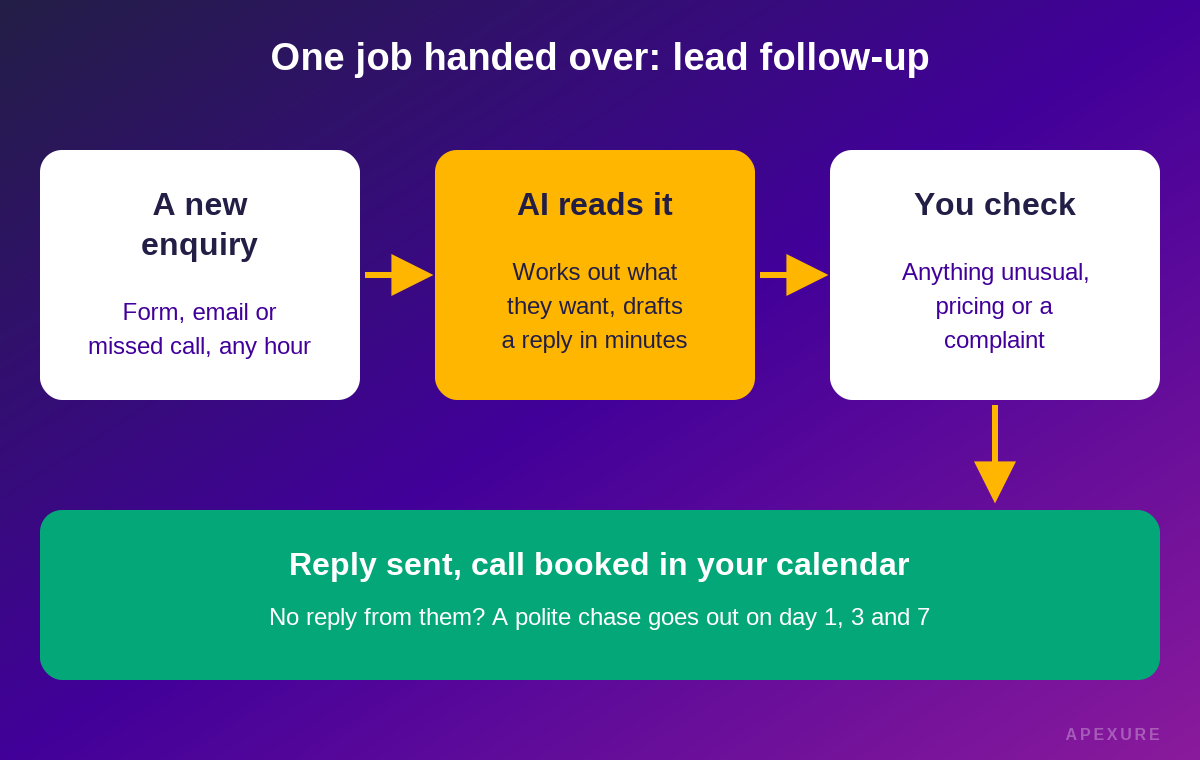
How to pick your first job
Don’t pick the job that sounds most impressive. Pick the one where a delay costs you work and a good result is easy to describe. Open each step for the detail.
Picking your first job in four steps
Replying to enquiries, writing quotes, chasing invoices, booking calls, updating the CRM. Most lists come out longer than the owner expected.
Replying to a new enquiry has a clear right answer: quick, polite, and it offers a time to talk. Deciding whether to take on a difficult client doesn't.
For most service firms that's the first reply to a new lead. A quote that goes out next week instead of today is a close second.
Keep a short log of anything it got wrong and fix the instructions. Add a second job only when the first one runs without surprises.
If you already pay for GoHighLevel or HubSpot, see what it can do before you buy anything new. Both have AI features now, and plenty of firms use a fraction of what they pay for. Our breakdown of what GoHighLevel really costs is a good place to start.
Not sure which job to hand over first?
Most small firms have tried AI, few have handed it a job
Plenty of owners use ChatGPT to write a post or tidy an email. Far fewer have given AI a piece of the business to run. The Federal Reserve’s latest survey of small employer firms found 46% use AI, about half of those are only experimenting, and just 7% of users have fully built it into the business (Federal Reserve Banks, 2026 Report on Employer Firms).
The most common use in the Fed’s survey is writing or marketing, at 83%. That’s the job an owner can do alone in a chat window. The jobs that save real hours need AI connected to your inbox, your calendar and your CRM.
What holds owners back
Cost isn’t the main worry. In a survey of 500 US business decision-makers, 46% said quality and trust held them back from using AI more, nearly twice as many as named cost (Textmagic, 2026). The Fed’s figures point the same way.
Accuracy and fit are fair worries, and the answer to both is to start small and keep a person in the loop. Almost nobody lets AI loose on customers yet:
“Only 4% of business leaders allow AI to send messages without any human review.”
That’s the right instinct. Read everything it sends at first, then move to a daily sample once it has gone a while without a mistake.
The other worry is who sets it up: 45% of small businesses in the same survey lack the technical staff to set up or manage AI workflows. That’s where cheap builds bite. When Veracode tested AI-written code, “45% of code samples failed security tests” (Veracode, 2025 GenAI Code Security Report). Anything that touches your customer list and inbox needs building properly and watching after launch.
Get your leads into one place first
An AI job is only as good as the systems it plugs into. If enquiries land in three places and nobody updates the CRM, AI will reply to the wrong person or miss someone. Getting every lead into one place as it arrives comes first.
We did that for Board Agenda, an independent media brand: their registration page synced every lead to the CRM as it came in.
Board Agenda: every registration straight into the CRM
Board Agenda, an independent media brand on corporate governance, needed a registration page for UK board directors. We built it with a step-by-step form and synced every lead to their CRM as it came in, so nobody copied registrations across by hand.
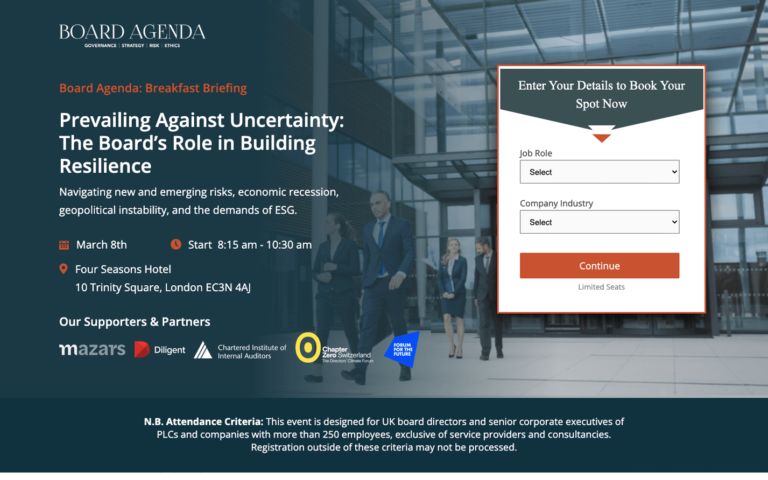
- 82 of 294 visitors registered, a 27.89 percent conversion rate.
- A registration form that asks for its information step by step.
- Leads synced with the client's CRM as they came in.
That kind of work starts with understanding how the business runs, before anything is built. One client put it like this in their review:
“They worked very hard to understand my business and customers. I felt like they really knew my business.”
A client, in their Trustpilot review
If your CRM is the real problem, our guide on when to build your own CRM covers when that’s worth it. And the video below shows the rule-based follow-up funnel that AI now plugs into.
An automated booking funnel, step by step
The rule-based version of lead follow-up I set up years before AI could write the replies: a landing page, a scheduler and emails that chase anyone who doesn't book. Worth seven minutes, because AI slots into exactly these steps.
Where Apexure fits
We’ve built more than 3,000 pages for over 300 clients since 2015, and most of that work was about what happens after someone clicks. The page wins the enquiry. Whether it turns into work depends on how quickly someone replies, whether the quote goes out the same day, and whether anyone chases the people who go quiet.
Those are the jobs we now build AI to take on. We build in your own accounts, so you own the workflows and the data, and we run it every month: watching what it sends, fixing what breaks and improving it. Our systems and automation page sets out what we build.
If you’d like to know which job to start with, book a free AI review. It’s a 30-minute call, and within 48 hours you get a written list of the three jobs AI could take off your plate first.
Questions owners ask
Is AI automation worth it for a very small business?
It can be, if the job you hand over happens often and costs you work when it’s slow. A two-person firm that misses enquiries while out on jobs gains more from instant replies than a bigger firm with someone on the desk all day. If nothing in your week repeats much, it probably isn’t worth it yet.
Do I need new software to automate with AI?
Often not. Many firms already pay for a CRM, GoHighLevel or HubSpot with AI features they haven’t switched on. Check what your current tools can do first, then connect the missing pieces.
Will AI reply to my customers without me knowing?
Only if you set it up that way, and you shouldn’t at first. Have a person read every reply for the first few weeks, then check a daily sample once it has proved itself. Keep prices, complaints and anything that moves money with a person.
Which jobs could AI take off your plate first?
A 30-minute call, then within 48 hours a written list of the three jobs AI could take on first in your business.

Waseem founded Apexure in 2015 and has led its work on 3,000+ pages for 300+ clients since. He writes about what the team sees after the click, which is pages, forms, tracking and the systems behind them.