
Three products, three modules, a demo button in each.
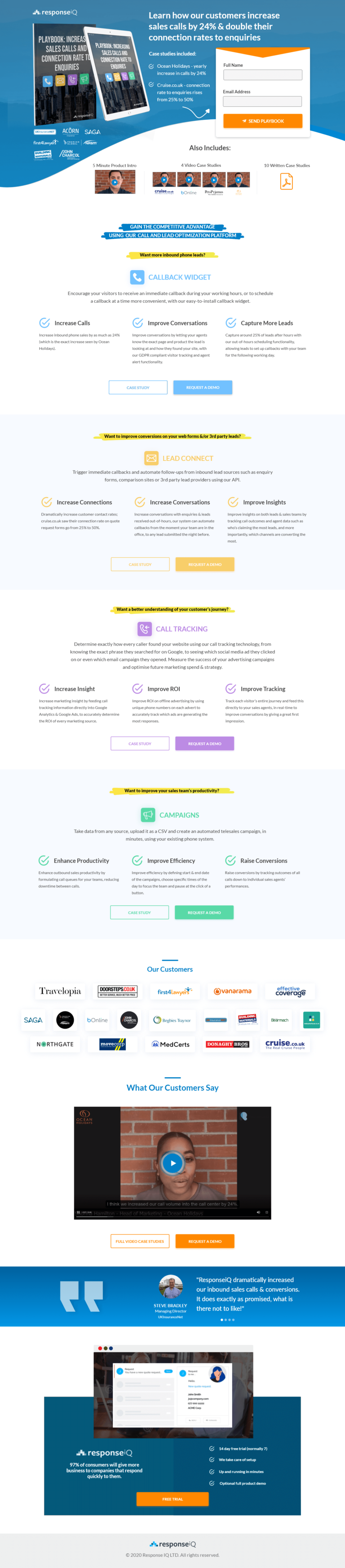
ResponseIQ's page for its lead-to-call software, aimed at sales and marketing managers and asking for a demo. Covers the announcement bar, the client logo grid, the Steve Bradley video and the pricing we would show.
- Primary CTARequest a Demothe button the page is built around
- GoalDemo Requestwhat counts as a conversion
- PlatformCustomproduct page page
- Built forB2BSaaS
- The page as built, not a mockup.Analysed by Apexure, not by ResponseIQ.
- Client
- ResponseIQSaaS
- Industry
- SaaS30 examples
- Audience
- B2BDemo Request
- Platform
- Custom38 examples
- Page type
- Product pageDemo Request
- Analysed by
- Waseem BashirMarch 2026
What the page does, and why
Why this page is built the way it is
ResponseIQ converts inbound web leads into immediate phone calls, and the page design shows that core promise structurally. The layout is fast, feature-dense, and action-oriented, matching the product’s own value: speed and precision in lead follow-up. There’s no padding for the sake of it. Every section earns its scroll depth.
Design decisions
The persistent yellow announcement bar
The announcement bar at the very top of the page performs dual duty. It names the visitor’s problem in plain language, and it differentiates from pages that open immediately with product descriptions. Starting with “Want to improve conversions on your web forms?” is empathetic before it’s promotional.
Three product modules with consistent visual structure
Each module features an orange category badge, a headline, three benefit items with check icons, and two CTAs (Case Study + Request a Demo). Together they make the page scannable without making it feel like three separate pages stapled together. The orange accent colour applied to all CTAs creates a thread of visual continuity through the scroll.
The customer logo grid
The grid features Travelopia, Doorsteps, First4Lawyers, Vanarama, bOnline, Barclays, NorthGate, iTrent, MedCerts, and Cruise.co.uk across multiple sectors. The diversity signals that ResponseIQ works across industries, reducing the instinct for any B2B buyer to self-exclude on the basis that the product wasn’t built for companies like theirs.
The page cites a specific statistic from the CustomerThink report: "97% of consumers will give more business to companies that respond quickly to them." That third-party data point transforms a product value claim into an industry fact. The page isn't arguing that ResponseIQ matters. It's citing evidence that response speed matters. The product then positions itself as the mechanism.
The video testimonial
The testimonial uses a real person on camera: an MD with a visible face, name, company, and candid delivery. The video player sits in a dark section that creates visual contrast with the white product modules above, signalling a shift in register. We’re no longer talking about features. We’re hearing from a real customer who’s already made the decision.
The product UI screenshot
The bottom section shows the actual interface: lead name, contact number, call status, timestamps. That specificity matters enormously for SaaS buyers evaluating whether the product will fit their existing workflow. Seeing a real interface reduces the abstraction of feature claims and makes the tool feel tangible rather than theoretical.
Trust architecture
ResponseIQ’s trust stack operates on four levels simultaneously. Named enterprise clients from multiple sectors create external validation. A specific third-party statistic provides empirical authority without self-reporting. An on-camera testimonial from a named director provides peer validation. The product UI shown in context provides transparency about what the buyer is actually purchasing.

"The case study link beneath each product module is underrated. Most visitors won't click it on their first visit, but its presence signals that proof exists, and the visitor knows where to find it when they're ready to make the internal case. In B2B SaaS, the person evaluating the tool often isn't the person who signs the budget. That link is for the second conversation."
The checklist near the free trial CTA ('14 day free trial (normally 7)', 'We take care of setup', 'Up and running in minutes', 'Optional full product demo') directly answers the four most common hesitations before clicking a SaaS trial button. Time investment, technical setup, complexity, and uncertainty about fit. Each bullet kills one objection.
Conversion strategy
The page has one primary conversion action (“Request a Demo” or “Free Trial”) but offers it at every product section so the visitor never needs to scroll back up once they’ve decided to act. The dual CTA format within each module (case study for researchers, demo for buyers) matches the two most common B2B visitor intents without requiring separate entry pages.
Offering both a soft conversion (case study: read more before committing) and a hard conversion (demo request: I'm ready to talk) within each product module captures visitors at different stages of the buying journey without requiring two separate landing pages or a multi-step funnel.
What we’d evolve today
Hero headline specificity. The top of the page leads with product names rather than outcomes. A headline like “Turn Web Enquiries Into Live Calls in Under 28 Seconds” would anchor the value proposition immediately and give visitors a metric to compare against their current reality.
Pricing visibility. The page ends with a free trial offer but doesn’t show pricing tiers. For SaaS buyers, price transparency near the CTA reduces the “I’ll need to speak to sales first” avoidance behaviour that kills demo request rates.
Mobile video optimisation. The video testimonial is the most persuasive proof on the page. Making sure it loads fast and auto-plays muted on mobile with captions would dramatically increase its exposure to visitors who scroll past static thumbnails.
Browse our full collection of landing page examples or speak to our team about optimising your SaaS conversion page.
Waseem founded Apexure in 2015 and has led its work on 3,000+ pages for 300+ clients since. He writes about what the team sees after the click, which is pages, forms, tracking and the systems behind them.
What the page leans on
The principles at work on this page, each named in the analysis above.
Authority bias
People trust credible experts. Certifications, awards, media mentions, and expert endorsements boost credibility.
Social proof
People follow the actions of others. Testimonials, reviews, and client logos build trust and reduce hesitation.
Reciprocity
Giving something valuable first (free guide, tool, audit) creates an obligation to reciprocate.
Anchoring effect
The first piece of information shapes all subsequent judgements. Price comparisons and headline stats set expectations.
Cognitive load reduction
Simpler pages convert better. Reducing visual noise, breaking forms into steps, and clear copy lower mental effort.
What people ask about pages like this
ResponseIQ offers Lead Connect, Call Tracking, and Campaigns, three products that address different stages of the sales process. By giving each a dedicated section with its own headline, benefit bullets, case study link, and demo CTA, the page allows different visitors to self-select into the product most relevant to their immediate pain point. A sales manager focused on callback speed will gravitate to Lead Connect; a marketing director tracking attribution will go straight to Call Tracking. One page, three entry points.
The persistent top bar, 'Want to improve conversions on your web forms & 3rd party leads?', functions as a pre-qualifying filter. Starting with the visitor's desired outcome rather than the product name reduces the cognitive distance between what the visitor wants and what the page offers. Outcome-first framing is one of the most reliable ways to reduce early bounce on SaaS pages.
The testimonial from Steve Bradley, Managing Director at Hillman.co.uk, gains its credibility from three things: a named individual with a visible role and company, a specific metric about increased inbound sales calls and conversions, and a video format that's harder to fabricate than text. The casual delivery, 'what is there not to like', paradoxically makes it more believable precisely because it doesn't oversell.
The challenge with multi-product SaaS pages is balancing comprehensiveness with cognitive load. We'd typically test a modular scroll layout against a tabbed navigation format to see which reduces drop-off between sections. We'd also look at whether a single unified hero CTA converts better than product-specific CTAs at each section. [Talk to our team](/contact-us/) about a structured audit of your SaaS page.
Three more, taken apart the same way



Want one like this?
Tell us what the page has to do and where the traffic comes from. Within 48 hours you get a written quote from the people who wrote this breakdown. Already have a page that is not converting? Send it for a free audit instead.
UK hours, which is the East Coast morning.
"SaaS pages have a specific tension. They need to explain enough that the visitor understands the product, but not so much that they get overwhelmed before they hit the demo CTA. ResponseIQ resolves this by giving each product module its own mini-page structure: headline, three benefits, one CTA. Scalable and digestible at the same time."